> For the complete documentation index, see [llms.txt](https://docs.candy-smith.com/bubble-shooter-toolkit/llms.txt). Markdown versions of documentation pages are available by appending `.md` to page URLs; this page is available as [Markdown](https://docs.candy-smith.com/bubble-shooter-toolkit/tutorials/ads-setup/ads-settings.md).
# Ads settings
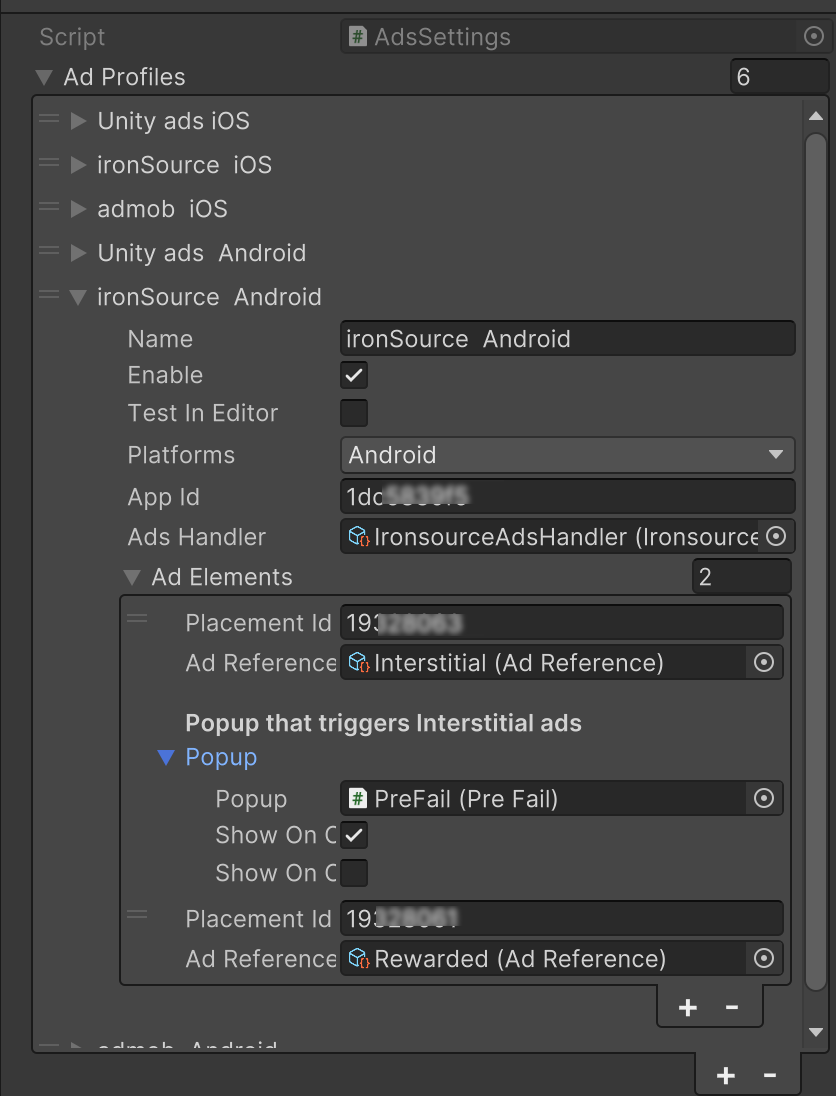
After you have created app in your ads account with ads like Banner, Interstitial and Rewarded you need to enter you appID and Placement ID (ads id) . You can create separate ad for each case in the game, that is why we hava separate placement for each event.
Access Ads settings via menu Tools->GameTemplate ->Settings->Ads settings
Ads settings window
### Ads settings:
* **Name** of the ad profile
* **Enable** - enables and disables profile (*several profiles on the same platrform will be shown in order and availability )*
* **Test in editor** - some networks have no ability to test in editor and throws an error
* **Platform** of the ad
* **App id** - you should take from the ad network account
* **Ads Handler** - is the script of integration, represents particular ad network you going to use for the ad
* **Ad elements:**
* **Placement id** you should take from ad network account
* **Ad reference** is the type of the ad, for rewarded ad it is also a reference to gameObject [(How to setup rewarded ads)](#rewarded-a-ds)
* **Popup** is popup which triggers interstitial. You can setup separate **placement id** for a popup for deeper analytics.
* Show On Open/Close - a moment to open an ad before or after popup
### Rewarded ads
How to setup rewarded adsYou can find example of using rewarded ads in next popups: Resources/Popups
* **LifeShop**
* **LuckySpin**
* **PreFail**
* **PreFailTime**
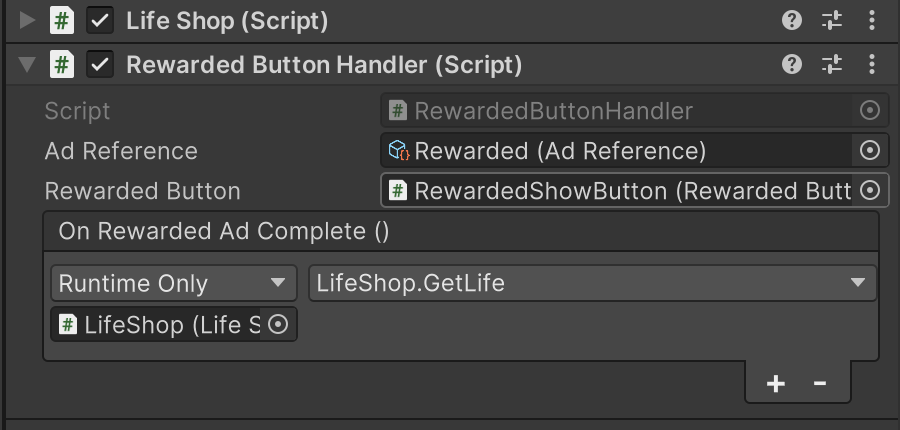
To add rewarded ad for a popup add **RewardedButtonHandler** component
RewardedButtonHandler using in the LifeShop popup
* Choose **Ad Reference** which represents a type of an add but you can create separate references for a rewarded ad for each placement id to separate analitycs.
* Assign **rewarded button** which call a rewarded ad
* Assign a **complete event**, if the rewarded ad successfully completed the event will trigger the method you will assign. In example we call LifeShop.GetLife after the player watched rewarded ad to award him with an extra life.
Troubleshooting:
* Make sure you can see the ads in the editor
* Try get logs from your device, sometime NO FILL is the reason you cannot see the ads. This means no ads available currently for the specific region
```
```