> For the complete documentation index, see [llms.txt](https://docs.candy-smith.com/main/llms.txt). Markdown versions of documentation pages are available by appending `.md` to page URLs; this page is available as [Markdown](https://docs.candy-smith.com/main/sweet-candy-sugar-match-3/settings-editor.md).
# Settings Editor
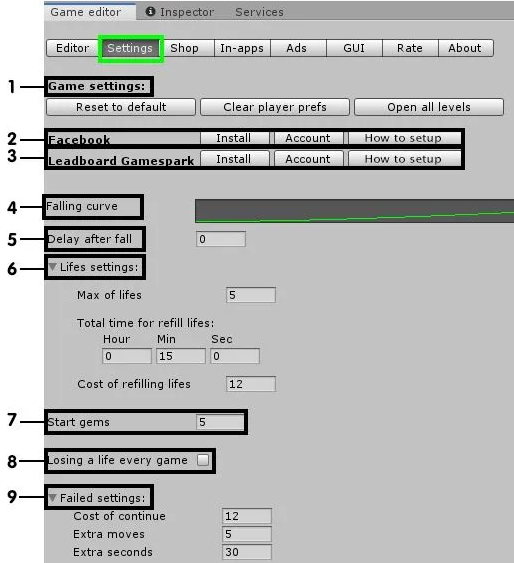
#### **1-**** Game Settings:**
* Reset to Default: Resets the editor settings to default.
* Clear Player Prefs: Resets player progress and all in-game currency.
* Open All Levels: Unlocks all levels for testing in the editor.
**2-**** Facebook:**
* Install: Install Facebook SDK.
* Account: Create a Facebook developer account.
* How to Install: Refer to the setup [guide](https://docs.google.com/document/d/1bTNdM3VSg8qu9nWwO7o7WeywMPhVLVl8E_O0gMIVIw0/edit?pli=1) for more information.
**3-**** Leaderboard Gamesparks:**
* Install: Install the Facebook SDK.
* Account: Create a Facebook developer account.
* How to Install: Refer to the setup [guide](https://docs.google.com/document/d/1JcQfiiD2ALz6v_i9UIcG93INWZKC7z6FHXH_u6w9A8E/edit#heading=h.hfcgq1iano0l) for more information.
**4-**** Falling Curve:**
* Falling Speed Curve of Game Items.
**5-**** Delay After Fall:**
* Pause after falling items.
**6-**** Lives Settings:**
* Max Lives: Set the maximum number of lives.
* Total Time for Lives Refilling: Set the time required to refill all lives (hours, minutes, seconds).
* Cost of Refilling Lives: Specify the cost of refilling lives through the shop.
**7-**** Start Gems:**
* Gems gifted to the player at the start of the game.
**8-**** Losing a Life Every Game:**
* Check the box if the player loses a life for each attempt at the level.
* Leave the box unchecked if the player only loses a life after failing a level.
**9-**** Failed Settings - Continue Level After Losing:**
* Cost of Continue: Specify the cost in coins.
* Extra Moves (for this cost).
* Extra Seconds (for this cost).