> For the complete documentation index, see [llms.txt](https://docs.candy-smith.com/main/llms.txt). Markdown versions of documentation pages are available by appending `.md` to page URLs; this page is available as [Markdown](https://docs.candy-smith.com/main/word-connect-game-toolkit/settings/coins-shop-settings.md).
# Coins shop settings
WordConnect/Settings/Shop Settings
### Coin Products Configuration
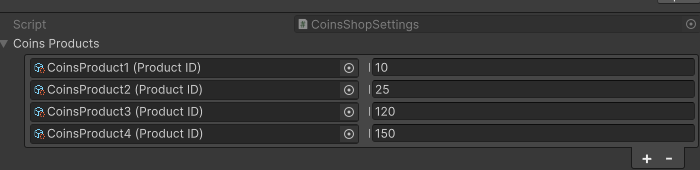
The Coins Shop Settings uses an array to define multiple coin purchase options. Each entry in the array represents a distinct product with its own Product ID and coin value.
#### Product Structure
Each coin product consists of two elements:
1. **Product ID**: A unique identifier for the in-app purchase product.
2. **Coin Value**: The number of coins the player receives upon purchasing this product.
#### Current Configuration
The image shows four coin products set up:
1. CoinsProduct1 (Product ID): 10 coins
2. CoinsProduct2 (Product ID): 25 coins
3. CoinsProduct3 (Product ID): 120 coins
4. CoinsProduct4 (Product ID): 150 coins
#### Adding or Removing Products
* To add a new coin product, click the '+' button at the bottom of the list.
* To remove a product, select it and click the '-' button.
### Best Practices
1. **Unique Product IDs**: Ensure each Product ID is unique and matches the identifier set up in your chosen in-app purchase platform (e.g., Google Play Store, Apple App Store).
2. **Value Progression**: Structure your coin products to offer better value for higher-priced options. This encourages players to consider larger purchases.
3. **Variety**: Offer a range of options to cater to different player spending habits, from small "impulse buy" amounts to larger quantities for committed players.
4. **Clear Labeling**: Although not shown in the Unity interface, make sure the in-game store clearly communicates the coin amounts and pricing for each product.
5. **Regular Updates**: Periodically review and adjust your coin products based on player purchasing patterns and feedback.